
How to switch ERPs without losing your trade partner connections
Summary
An ERP migration doesn't just change internal systems. It also changes how orders, shipping notices and invoices are exchanged with customers, suppliers and logistics partners.
These connections are often only considered late in the project. Yet they contain partner-specific rules, master data and special cases that aren't automatically carried over to the new ERP.
The result: the ERP is ready to go live, but trading partners can't yet work reliably through the new system.
This guide shows why trading partner connectivity should be its own workstream, and how companies can plan it in five steps. Procuros handles the EDI migration end-to-end, so it doesn't end up as extra work for your team.
1. ERP migration also means continuing relationships
An ERP maps your core business processes. But orders, shipping notices and invoices flow across company boundaries.
For these processes to work, both sides need to understand the same data and rules. These include item numbers, GLNs, units, delivery addresses and rules for partial deliveries.
When you switch ERPs, data structures, fields or processes often change. Existing EDI connections therefore need to be reviewed and set up for the new ERP.
The switch is only complete once your trading partners can work with the new setup too.
2. Why this workstream is easy to underestimate
If you only look at the technical connection, you're not planning the whole process.
3. Decouple trade partner connectivity from the ERP
When switching ERPs, companies should decide which processes belong in the ERP, and where partner connectivity is better organized separately.
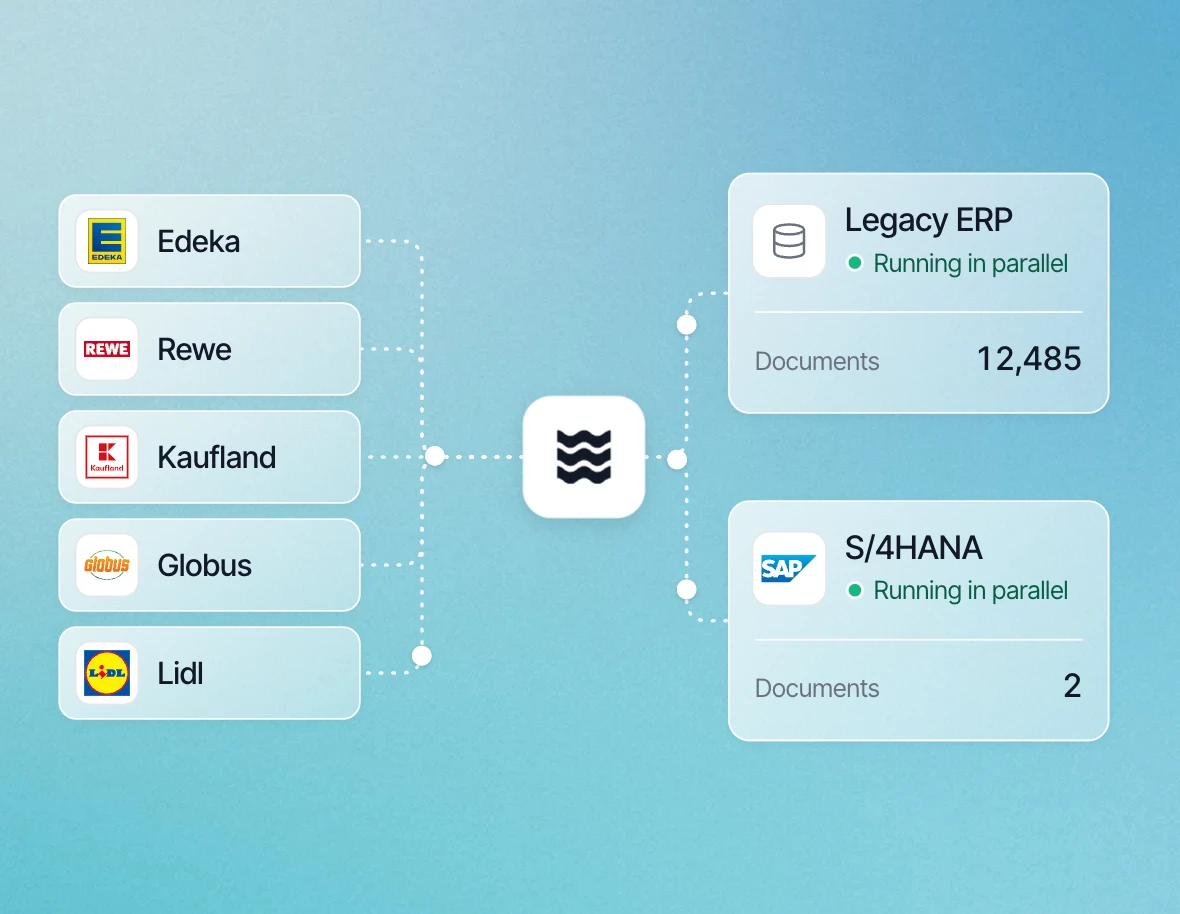
The ERP remains the leading system for internal business processes and master data. A connectivity layer handles formats, partner rules, routing, validation and exceptions.
That way, partner-specific logic doesn't have to be rebuilt in the new ERP for every connection. And a future ERP switch doesn't mean setting up all partner connections again.
Your choice of ERP and the way you communicate with trading partners don't have to be tied together.
4. Five steps to a safer ERP transition
1. Define the scope and migration plan
Procuros maps your trading partners, document types and workflows—including EDI connections, manual PDF and email processes, custom fields and partner-specific rules. Together with you and your ERP implementation partner, Procuros agrees what should stay, what should change, and who owns each part of the transition.
Outcome: a shared scope, clear responsibilities and an agreed migration plan.
2. Prepare the data your workflows depend on
Procuros reviews customer and item numbers, delivery addresses, GLNs, GTINs, packaging units, prices and partner-specific identifiers, and identifies the data and mapping requirements for document exchange. Your team and ERP implementation partner take care of the master-data corrections in the new ERP.
Outcome: consistent identifiers and clear ownership for data gaps before testing.
3. Connect partners independently of the ERP change
Procuros takes end-to-end ownership of partner connectivity: connections, document mappings, partner-specific requirements and technical coordination with trading partners and logistics providers. Where the project allows, Procuros establishes these connections while the old ERP is still running, then adapts the ERP-facing connection for the new system—rather than rebuilding every partner connection at go-live.
Outcome: partner connectivity prepared ahead of the ERP switch, with established connections retained where applicable.
4. Test complete workflows together
Procuros validates the agreed inbound and outbound flows with the relevant partners—from partner document exchange through processing in the ERP—including connectivity, mappings and document delivery. Your team and ERP implementation partner confirm that documents create the correct business results. Special cases such as partial deliveries, unit conversions, billing rules, duplicates and error handling are also fully covered.
Outcome: tested document flows and business approval before cutover.
5. Manage cutover and stabilize live operations
Procuros plans the switch sequence with you, including readiness criteria and how outstanding documents and exceptions are handled. Where appropriate, the transition happens in phases by partner or document type. Procuros monitors the agreed document flows and handles exceptions, while your team and ERP implementation partner resolve ERP and master-data topics.
Outcome: a controlled cutover, visible exceptions and a clear handover to ongoing support.
5. The key questions before go-live
- Have all affected customers, suppliers and logistics partners been identified?
- Are all document types and special rules known?
- Is the required master data available in the new ERP?
- Have the relevant processes been tested with your partners?
- Are cutover, monitoring and error handling clarified?
- Are PDF and email orders included in the target process?
If any of these questions is still open, add it to the project plan before the ERP go-live gets closer.
Conclusion: ERP projects don't end at the system boundary.
Switching to a new ERP is an opportunity to review old manual steps and workarounds that have built up over time. To do that, companies need to consider partner communication early and be clear about who owns its migration.
Procuros handles the EDI migration, from the initial assessment to go-live. One less workstream for your team.
Summary
An ERP migration doesn't just change internal systems. It also changes how orders, shipping notices and invoices are exchanged with customers, suppliers and logistics partners.
These connections are often only considered late in the project. Yet they contain partner-specific rules, master data and special cases that aren't automatically carried over to the new ERP.
The result: the ERP is ready to go live, but some trading partners can't yet work reliably through the new system.
1. ERP migration also means continuing relationships
An ERP maps your core business processes. But orders, shipping notices and invoices flow across company boundaries.

Want to continue reading?
Enter your email to keep reading.